Stop rewriting the same schedule.
Bring in your schedule once. Get a clear text for each trade, with their upcoming jobs and dates together.

Built for busy superintendents
FunnelPhase instantly turns your schedule and jobsite photos into organized trade texts and correction lists. Spend less time rebuilding lists and more time moving the job forward.
Messy in. Organized out.
Free testing. No payment details or automatic trial deadline.
Your day has enough moving parts
Bring in your schedule once. Get a clear text for each trade, with their upcoming jobs and dates together.
Keep correction photos with the right lot and trade, so the picture and the problem stay together.
Prepare one-week reminders and two-working-day confirmations from start dates, without mid-job notice clutter.
See what comes out
Start with the schedule you have. Tap an example to see the calendar, trade text or photo inspection flow.
EXAMPLE · FOUR COLUMNS TO START
Lot, Scope, Start Date and Finish Date. Put all your schedule items on one Excel worksheet and upload the complete sheet together.
Saved scope assignments fill in matching managers and Order numbers. Review the loaded rows before saving. No Duration column is needed.
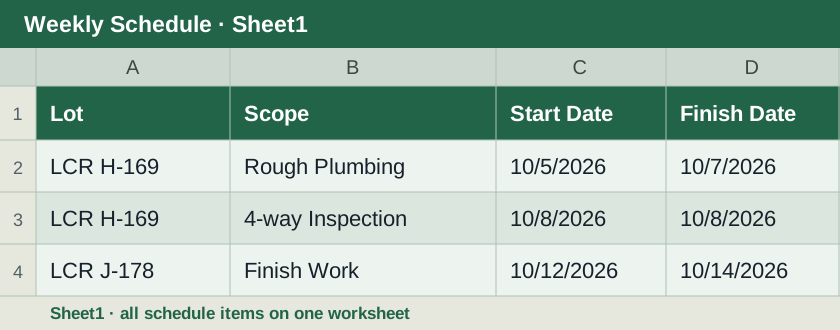
Lot · Scope · Start Date · Finish Date
One task per row. Include a Finish Date even for one-day work.
View larger Excel exampleYour crew, your call
FunnelPhase works either way. Choose how involved your trades should be.
Review the organized texts and correction photos, then send them to each trade from your usual phone or email. Trades do not need to sign in.
Invite trades to see their assigned correction lists, add completion notes or fixed photos, and submit work for your review. You decide when to approve and close it.
Record the correction and its room location. Review one photo at a time, then Save & next.
Combine the building’s corrections while keeping each unit clearly labeled. Prepare the matching photo file with lot dividers.
Keep completion notes, photos and timestamps with the correction, so you have the story when you look back.
Easy to get started
Add your jobs and trades, one step at a time. Save & next takes you forward; optional links can wait.
Upload your schedule or take photos on a job walk. Review the dates and suggested assignments.
Your trade texts and correction lists are ready to check and share. Use the calendar to see who’s working.
Try it on a real workday
Try it free. Bring your own schedule and photos, and see how the workflow fits your crew.
Free while Devon gathers feedback.
Create your account. Devon approves access, and your workspace stays separate from everyone else’s. Testing is free with no automatic deadline.
Texts are prepared for you to review, copy and send. Automatic delivery is not active yet.
No. Use your existing Excel schedule with Lot, Scope, Start Date and Finish Date. Put all tasks on one worksheet and upload the complete sheet together. You can also paste a table or upload clear schedule photos, then review the extracted rows.
Guided setup shows one step at a time and remembers where you left off. Everyday work stays in Scheduling or Photos; the setup menu is there when something changes.
It prepares the texts. You review, copy and send them from your usual messaging or email app. Automatic text and email delivery is not active yet.
No. You can send the prepared texts and photos yourself. If you invite trades into TradeLot, each trade can view its assigned corrections and submit completion notes or fixed photos; a manager reviews and closes the work.
Yes. Use your phone for job walks and your computer for schedules and organizing. Saved Voice Walk drafts stay on the device where you made them until uploaded; reconnect before finishing the inspection.